pixie.codes pixie.codes
GS1 Digital Link platform

GS1 Digital Link software for governed rollout, not just QR creation

Evaluate pixie.codes as the software layer for GS1 Digital Link rollout: resolver control, destination governance, analytics continuity, and a cleaner bridge from packaging decision to in-market execution.

Resolver governance and defaults Analytics continuity after packaging is printed Operational evidence for Sunrise 2027 rollout and scan-safe brand execution

What this software layer is supposed to do

The software question is usually where Sunrise 2027 programs either become durable or stay fragile. The pixie.codes value proposition is not that it stores links. It is that it governs how product identity, destinations, and rollout evidence behave over time.

Resolver governance

Set controlled defaults and change paths

Make it explicit who can update destinations, when, and under what approval model.

Analytics continuity

Preserve evidence through campaign and product changes

A printed package often outlives the landing page behind it. The software layer should account for that.

Operational handoff

Bridge creative, packaging, data, and operations

The system should reduce ambiguity, not increase it, when branded QR decisions, scan evidence, and routing ownership change hands mid-rollout.

Evaluation point Generic link or QR stack pixie.codes Digital Link software position
Domain and routing ownership Often loosely owned or campaign-specific. Explicitly part of the operating model.
Change after packaging lock Handled informally, if at all. Treated as a first-class requirement.
Sunrise 2027 readiness Usually tangential. Positioned around governed rollout, verification, and launch evidence.
Styled-code verification Often judged as a design exercise with little launch evidence. Better aligned to scan-safe review, conformance evidence, and post-print control.
Live resolver workspace

Search, analytics, routing setup, and asset inspection in one operating view

This capture shows the actual resolver workspace pattern: organization context, domain filtering, resource search, analytics, and configuration controls in the same interface.

pixie.codes Resolver Studio showing organization filtering, search results, analytics summary, and resolver configuration controls

The commercial point is not just QR generation. It is keeping the live operating context for domains, links, resources, and analytics in one place after packaging is already in market.

Live product capture from a seeded resolver workspace
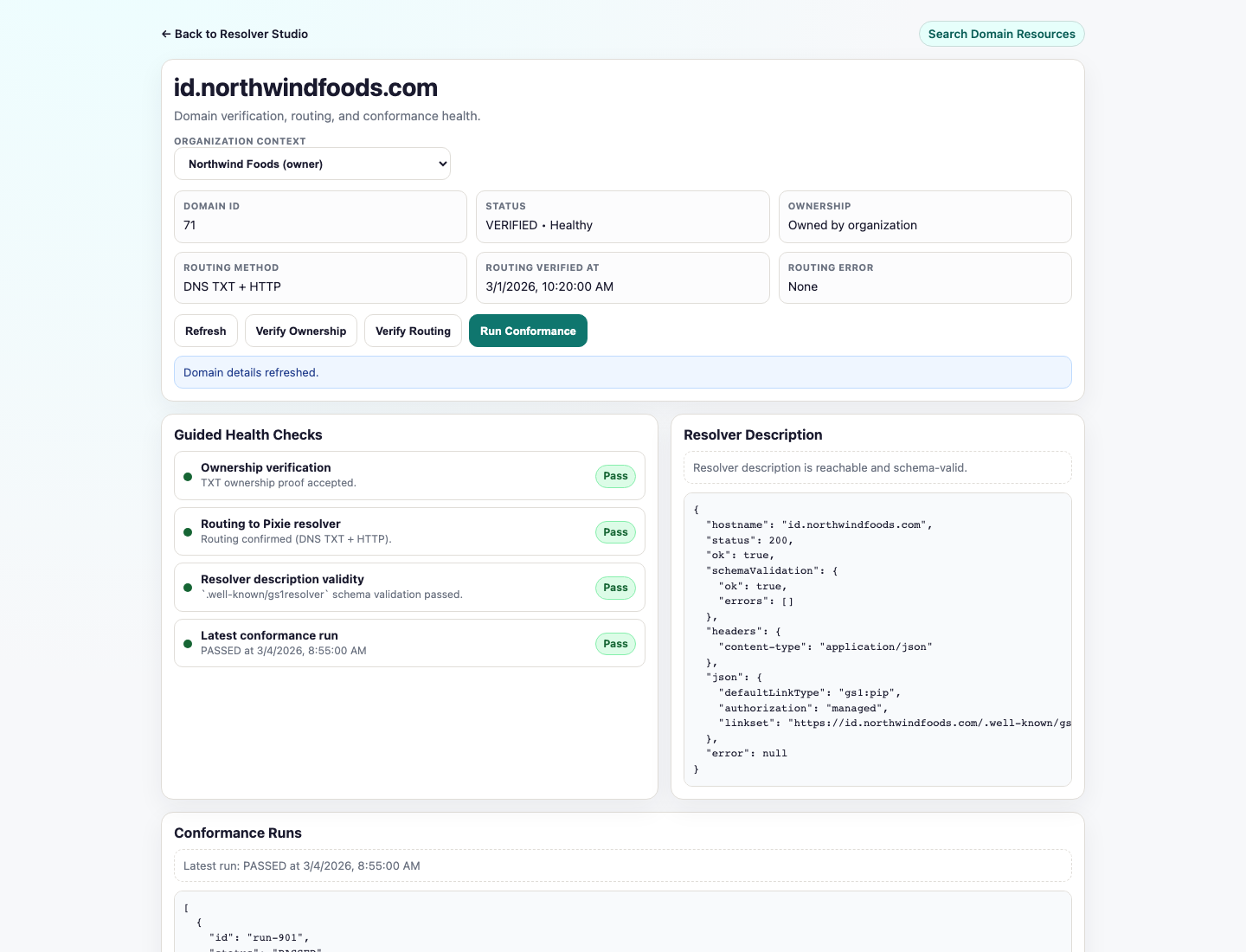
Live domain conformance view

Verification health and resolver evidence stay attached to the domain itself

This view shows the part generic QR stacks usually lack: domain-level verification, resolver-description health, and repeatable conformance evidence linked to the production hostname.

pixie.codes resolver domain screen showing domain verification, conformance status, and resolver description health checks
  • Verification status, routing method, and conformance history stay with the domain record.
  • Resolver description validity and latest checks are visible without leaving the operating surface.
  • Launch evidence is inspectable after print instead of buried in disconnected tools.

Where this fits in the full workflow

Think of the software layer as the connective tissue between QR creation, launch control, and in-market change management.

Upstream

Product identity and packaging decisions

GTIN data, payload rules, artwork constraints, and launch requirements feed into the software layer.

Downstream

Resolver, analytics, and operator workflow

Once the package is printed, the software layer becomes the place where operational changes need to stay controlled.

Frequently asked software questions

Is this the same thing as the QR generator page?

No. The QR generator page is the more self-serve asset creation path. This page is about the broader software layer and whether pixie.codes fits your governed GS1 program.

Does this replace our PIM or DAM?

No. pixie.codes should be evaluated as the execution and control layer around QR generation, destinations, resolver governance, and rollout evidence, not as your full enterprise system of record.

Should we start here or on GS1 Access?

Start here for the commercial framing. Go to GS1 Access when you want to inspect the broader feature posture and operator workflow language.

What if we just need to get a pilot moving?

Go to the pilot page. That is the better route when the immediate question is execution sequencing rather than platform evaluation.

Commercial handoff

Evaluate the platform, then choose product or pilot.

If you want the broader feature posture, continue to GS1 Access. If you are ready for asset creation or rollout planning, move directly into those paths.